
Auto LODs
Improve performance of your crowds by generating automatic LODs.
LOD (Level of Detail) is a common graphics technique used to improve performance by adjusting the complexity of 3D models, textures, or simulations based on their distance from the camera.
Popul8 Express provides automatic LOD generation, allowing you to define the mesh-reduction percentage for each LOD level as well as the pixel-height thresholds that determine when the crowd renderer transitions between them.
How to Configure LODs
Select your main template. In the inspector, a LOD Configuration object will be displayed.
The Auto LODs toggle is enabled by default. If it is not, enable it to allow LOD generation.
The LODs will be automatically generated for your selected template and all the deformables listed under it. By default, four LODs are created.
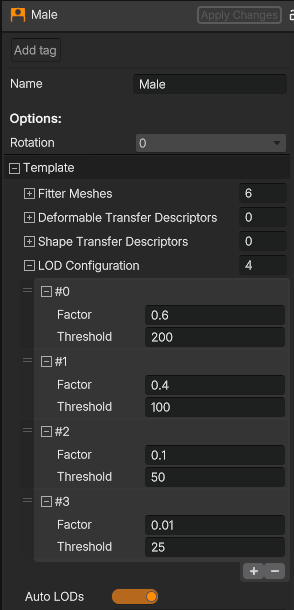
There are two values that can be adjusted for each level:
- Factor - A value between 0 and 1 representing the percentage of polygons from the Base Model meshes to keep when generating the LOD.
- Threshold - The screen-space height of the character, in pixels, at which this LOD becomes active for every asset on that character. For simplicity, this assumes the object has a height of 1 meter.
You can easily adjust these parameters, add new LOD levels, or remove existing ones, as needed.
LODs are exclusively applied to crowd characters.
Updated 11 months ago